
 Matt
Matt
How to Bring Cold Leads Back to Life with HubSpot
 Matt : Jan 21, 2026, 2:15:02 PM
Learn how MSPs can use HubSpot inbound workflows to re-engage silent leads, accelerate nurture, and turn cold contacts into sales opportunities.
MSP lead automation uses connected tools to instantly capture, score, and nurture potential clients, eliminating manual effort and ensuring timely, personalized follow-up. This process (Capture, Score, Nurture, Trigger human follow-up, Review) optimizes team effort by handing off sales-ready leads with full context, resulting in a cleaner pipeline and predictable growth.
It’s Monday morning. Your inbox overflows with tickets, alerts, and follow-ups from last week’s webinar. Amid the chaos, two new leads appear: a co-working space struggling with downtime and a logistics start-up seeking faster support.
By the time you address your queue, it’s Wednesday. The leads have gone cold.
This silent leak slows many Managed Service Provider (MSP) pipelines, not because prospects aren’t interested, but because of slow follow-up and limited personalization.
MSP lead automation changes that. It captures every inquiry, reads intent, and responds before curiosity fades. Your team stays focused on clients while automation turns almost-lost opportunities into booked calls and revenue.
Let’s see how it works.
MSP lead automation uses connected tools to help your business attract and nurture potential clients automatically. It links your marketing and sales systems so each lead is logged, tracked, and moved through the funnel without manual effort.
Here’s how it helps your MSP grow:
Suppose a small-business owner downloads your Cybersecurity Checklist. Instantly, the system tags them as “interested in endpoint security,” adds them to your Customer Relationship Management (CRM), and kicks off a personalized email series.
If they open your case study or book a consult, automation alerts your sales rep to reach out. No missed leads. No confusion. Just a steady, trackable path from interest to close.
As the managed services market approaches $500 billion by 2028, timing and consistency are key to winning deals.
MSP lead automation gives both. Here’s how it works:
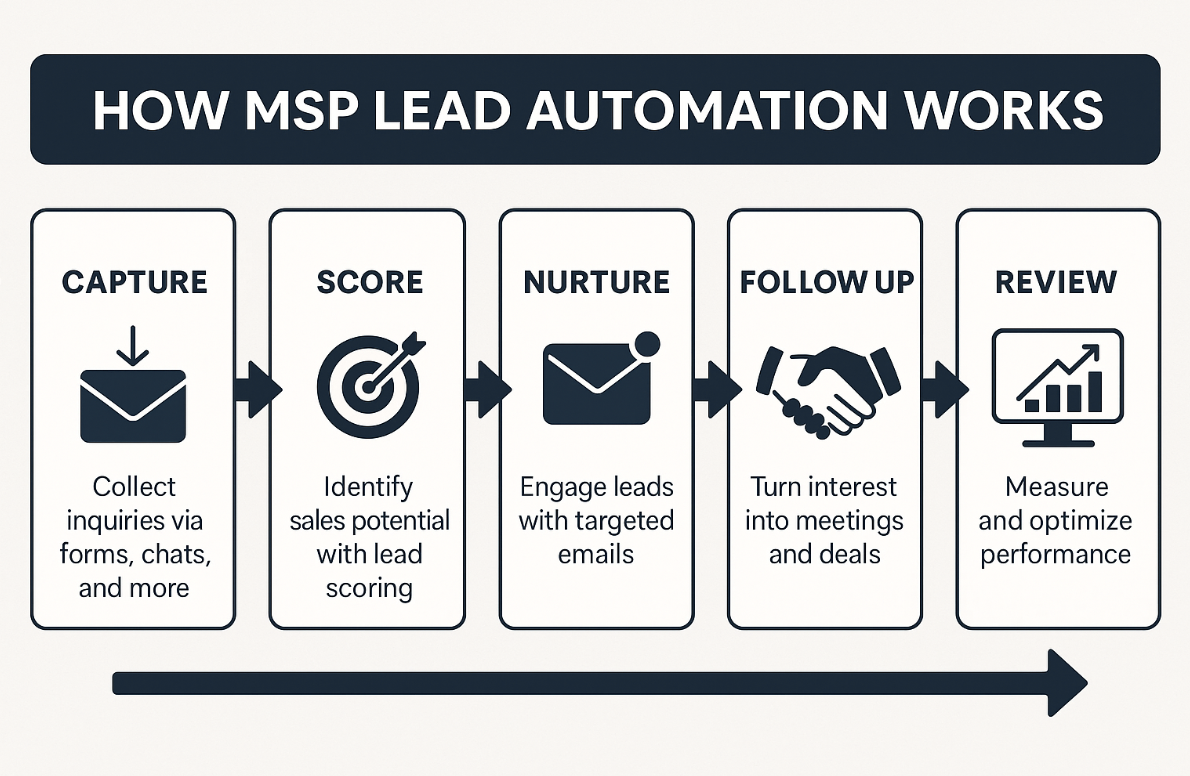
It all starts the moment someone interacts with your MSP online. A visitor can fill out a form, click an ad, or start a chat. In that instant, your automation should spring into action.
Why? Because when lead volumes hit 1,800 a month for many businesses, tracking every conversation isn’t realistic. That’s where tools like HubSpot make all the difference.
Once the lead is in your system, automation tools enrich the record, fill gaps, and remove duplicates. That context turns a bland “Hi there” into “Hi Mark, saw your team just expanded in Dallas.”
| Pro Tip: Consider using Apollo.io to capture and qualify leads. Its B2B database, smart filters, and CRM sync help your MSP reach the right prospects first. |
Not every lead deserves the same follow-up. Some just skim a blog, others check pricing twice. MSP marketing automation helps you see the difference.
Your CRM tracks behavior and assigns value, say 10 points for a case-study view and 25 for a demo request. When a contact crosses your “hot-lead” threshold, the system alerts your rep with full context.
For instance, if a company posts multiple IT-support openings on LinkedIn and starts viewing your scaling-support packages, that’s an urgency you don’t want to miss.
| Pro Tip: HubSpot’s Buyer Intent Tool uses machine learning (ML) to analyze data points that hint at purchase intent, helping you focus on leads most ready to bite. |
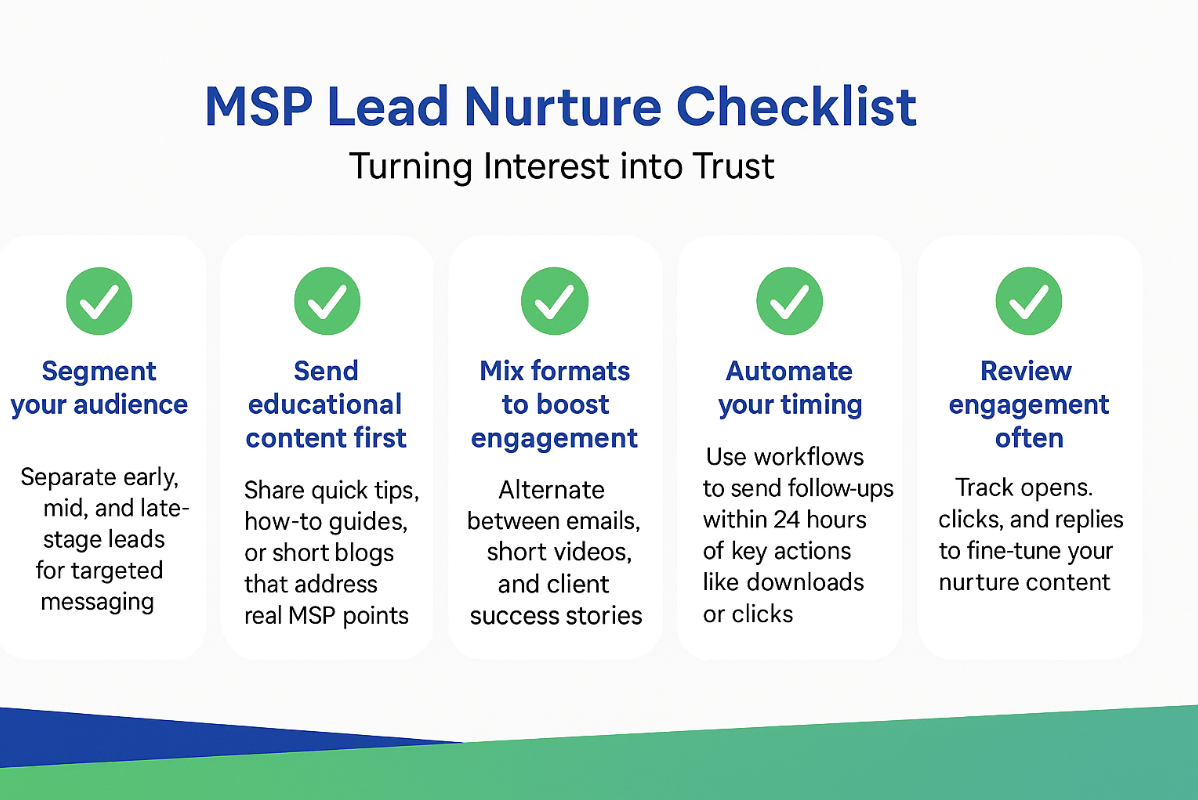
Instead of blasting every contact with the same follow-up, personalize content to match each stage of curiosity. And it pays off—96% marketers say tailoring messages to each lead has boosted sales.
Here’s how your MSP can do it:
MSP marketing automation tools, such as ActiveCampaign or HubSpot Workflows, can schedule follow-ups, trigger messages based on clicks, and send timely reminders.
| Pro Tip: Build separate nurture sequences for each service line. Three to four helpful touchpoints are more effective than one long pitch every time. |
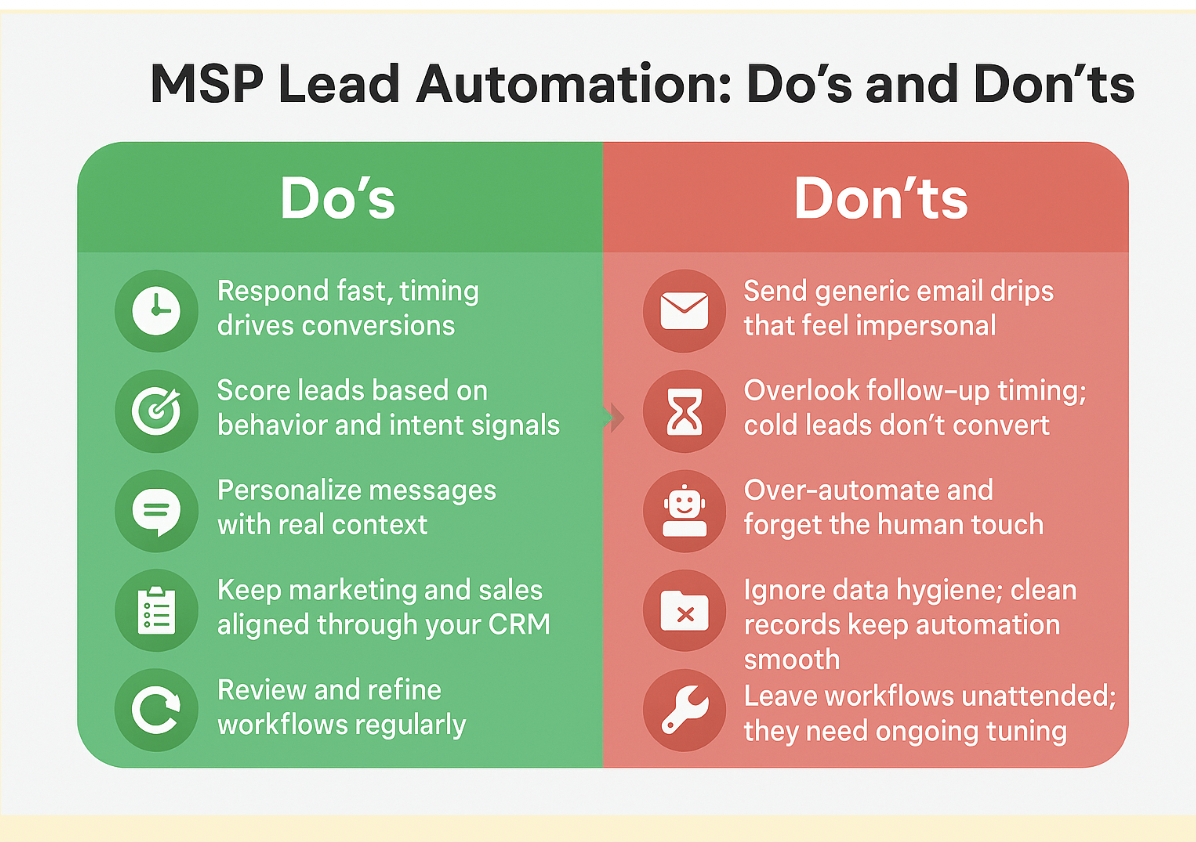
MSP lead automation shouldn’t replace your team—it should optimize their timing.
Once a lead shows intent, fast and focused follow-up is what seals the deal. A delay or the wrong handoff can turn a warm lead cold.
Use rules like region, service type, or account tier to automatically route leads. A healthcare client from Chicago? Route them straight to your compliance expert. A retail chain asking about backups? Assigned to your infrastructure rep.
Automation isn’t “set it and forget it.” The smartest MSPs treat it as a living system that keeps learning and improving.
Once your workflows are live, pause for a moment and look at what’s really driving results. Focus on numbers that show the true picture:
If your “Demo Request” emails convert twice as fast as your “Pricing Page” ones, you’ve found your winner. Keep refining from there.
| Pro Tip: Check HubSpot Reports or Looker Studio to see what’s picking up momentum. Pair that data with your team’s input to find and fix gaps early. |
| Also Read: MSP Marketing Agencies: All You Need to Know |
MSP lead automation isn’t about replacing people. It’s about amplifying your team’s performance.
When your systems capture and nurture automatically, your team wins back time to focus on what matters most: building trust, solving problems, and closing deals.
If you’re ready to turn your marketing engine into a predictable lead machine, Tactics Marketing can help you build a setup that runs while you scale. We not only implement smart automation workflows but also customize them for your MSP’s unique services, target audience, and sales process.
Book a personalized demo to learn more!
1. Can I start lead automation without a CRM?
You can, but it’s limiting. The right CRM for MSPs gives structure, visibility, and keeps every automation connected in one place.
2. How do I know if my MSP even needs lead automation?
Still juggling spreadsheets or chasing leads that went cold? That’s your signal to automate and bring consistency back to your pipeline.
3. How quickly can I see results from MSP lead automation?
Results vary depending on your current processes and lead volume, but many MSPs notice faster follow-ups, higher engagement, and more qualified leads within the first few weeks of implementation. Continuous optimization ensures the pipeline keeps improving over time.
 Matt : Jan 21, 2026, 2:15:02 PM
Learn how MSPs can use HubSpot inbound workflows to re-engage silent leads, accelerate nurture, and turn cold contacts into sales opportunities.
 Monica : Mar 3, 2025, 11:32:00 AM
Discover how MSPs can leverage digital marketing to attract qualified leads, nurture lasting client relationships, and drive sustainable business...
 Matt : Aug 19, 2025, 6:24:19 AM
Scale your lead generation for IT services! Explore top lead generation channels for MSP marketing that are sure to boost your ROI.